
“Which file do I edit for this page?”—WordPress looks for templates in a fixed order based on the type of URL (the template hierarchy). Here’s a cheat sheet for the parts you’ll actually use.
There’s one rule underneath it all—it looks for the most specific file first, falls back toward the more general, and finally lands on index.php.
Cheat sheet by URL
The numbers are the search order. It works from 1 onward and uses the first file it finds (moving to the next number if it doesn’t exist).
| Page being displayed | 1 | 2 | 3 | 4 | 5 | 6 |
|---|---|---|---|---|---|---|
| Front page | front-page.php | home.php or page.php* | index.php | |||
| Post archive | home.php | index.php | ||||
| Single post | single-post.php | single.php | singular.php | index.php | ||
| Static page | The chosen page template | page-{slug}.php | page-{ID}.php | page.php | singular.php | index.php |
| Category archive | category-{slug}.php | category-{ID}.php | category.php | archive.php | index.php | |
| Tag archive | tag-{slug}.php | tag-{ID}.php | tag.php | archive.php | index.php | |
| Custom taxonomy | taxonomy-{name}-{term}.php | taxonomy-{name}.php | taxonomy.php | archive.php | index.php | |
| Custom post type archive | archive-{post type}.php | archive.php | index.php | |||
| Custom post type single | single-{post type}.php | single.php | singular.php | index.php | ||
| Search results | search.php | index.php | ||||
| 404 | 404.php | index.php | ||||
| Date archive | date.php | archive.php | index.php | |||
| Author archive | author.php | archive.php | index.php | |||
| Attachment | attachment.php | single.php | index.php |
*The second slot for the front page is home.php if “Your homepage displays” is set to your latest posts, and page.php if it’s set to a static page.
Only two files are required: index.php and style.css. Everything else is optional, and gets substituted in the order above.
The classic stumble: front-page.php and home.php
The confusion comes from the names not meaning what you’d guess.
front-page.php—the site’s front page (https://example.com/)home.php—the post archive page
If front-page.php exists, it wins, regardless of whether the front page is set to latest posts or a static page. When “I set a static page as the front page but it doesn’t show,” check whether this file exists.
How to check which file is being used
Don’t guess—checking is faster.
Easiest: show it in the admin bar with a plugin
Install Query Monitor and the name of the template in use appears in the admin bar. Open the panel and you also see “the list of candidates it looked for” and “the template parts that were loaded,” so you can see exactly where in the hierarchy the decision was made. The biggest advantage is that you don’t touch any code.
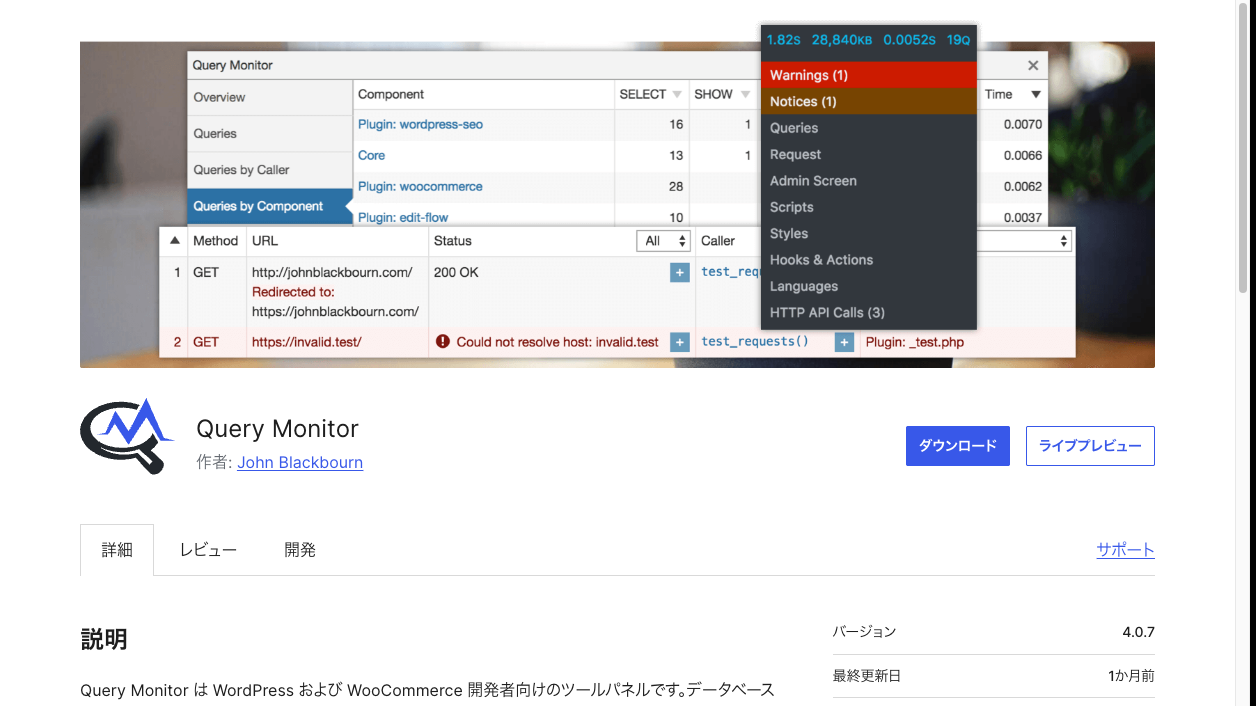
Below are ways to check in environments where you can’t install plugins (investigating production, for instance).
Drop in a marker
<?php echo '★single.php'; ?>Put it at the top of the file you suspect and see whether it appears. If it doesn’t, another file is responsible.
Infer it from body_class
If you have <body <?php body_class(); ?>>, the HTML carries information like class="single single-post postid-42". Look at the body classes in your browser’s developer tools and you learn the page type, which narrows down the responsible file.
Print the template name
add_action('wp_footer', function () {
  global $template;
  echo '<!-- template: ' . esc_html(basename($template)) . ' -->';
});
The responsible file name appears in an HTML comment. Remove it on a public site, or add a condition so it only shows while you’re logged in.
Splitting templates up (shared parts)
This is the mechanism that stops you from writing the same HTML across many templates.
<?php get_header(); ?>       <!-- header.php -->
<?php get_footer(); ?>       <!-- footer.php -->
<?php get_sidebar(); ?>      <!-- sidebar.php -->
<?php get_template_part('parts/card'); ?>            <!-- parts/card.php -->
<?php get_template_part('parts/card', 'wide'); ?>    <!-- parts/card-wide.php -->
You can also pass values to get_template_part() (the third argument).
<?php get_template_part('parts/card', null, ['size' => 'large']); ?><?php $size = $args['size'] ?? 'medium'; ?>Turn the HTML for one item in a list into a part and you can reuse it on the front page, category archives and search results. Fixes happen in one place too.
Three ways to give static pages their own design
page-about.php—only for the static page with the slugabout(just creating it is enough)page-12.php—by ID (survives a slug change, but the ID is hard to recognize)- A page template—chosen from the editing screen
<?php
/**
 * Template Name: Landing page (single column)
 */
?>
Write Template Name: at the top and it becomes selectable from “Template” in the static page editing screen. This approach is handy when several pages share the same layout.
What about block themes (FSE)?
Everything so far has been about themes that build templates from .php files (classic themes). In a block theme—the kind where you edit the whole site in the block editor—templates are .html files rather than .php.
First, work out which kind your theme is
Looking at the “Appearance” menu in the admin screen is quickest.
- There’s an “Editor” → block theme (templates are
.html) - Only “Theme File Editor” (and there’s a “Customize”) → classic theme (templates are
.php)
Judging from the theme folder, a templates/ folder plus theme.json means a block theme.
File structure
your-theme/
├── templates/          ← templates (.html, not .php)
│   ├── index.html
│   ├── single.html
│   └── page.html
├── parts/              ← in place of header.php / footer.php
│   ├── header.html
│   └── footer.html
├── theme.json          ← settings for colors, font sizes and so on
└── style.css
The required files are templates/index.html and style.css—the same position index.php holds in a classic theme.
The cheat sheet still applies
The search-order rules are the same; only the extension changes.
| Classic theme | Block theme |
|---|---|
single-shohin.php → single.php → index.php | single-shohin.html → single.html → index.html |
Read .php as .html in the cheat sheet above and it carries over as-is. How you edit them is a different story, though: rather than writing files directly, you normally edit from “Appearance → Editor” in the admin screen (what you save is recorded in the database and takes priority over the theme’s files).
Summary
- WordPress searches for templates in the order specific file → general file →
index.php front-page.phpis the front page,home.phpis the post archive—don’t let the names fool you- When unsure, confirm the file actually in use with Query Monitor (or an echo marker, or
$template) - Split shared parts out with
get_template_part(). For static pages, usepage-{slug}.phpor a page template
Once you can see at a glance where to make a change, customization gets dramatically faster.