
If a theme is a dress-up swap for “appearance,” a plugin is an add-on part for “features.” A contact form, a popular-posts ranking, automatic backups—the feature you want has usually already been turned into a plugin by someone. Just like installing an app on your phone, you can add features to your site.
A plugin is an app you install into your site
Bare WordPress is actually a simple piece of software that “can only write articles.” You add just the features you need with plugins—and thanks to this design, everything from a blog to an online shop can be built with the same WordPress.
Remember how you added extensions to VSCode to make it a tool that suited you? This is exactly the same idea.
Here are a few of the go-to standards—
| Feature you want | Example of a standard plugin |
|---|---|
| Contact form | Contact Form 7 |
| Groundwork for SEO | Yoast SEO |
| Automatic backups | UpdraftPlus |
| Security hardening | Wordfence Security |
Installing is the same two steps as a theme
From the admin screen, go to “Plugins” → “Add New Plugin” to browse the official directory. This one has over 60,000.
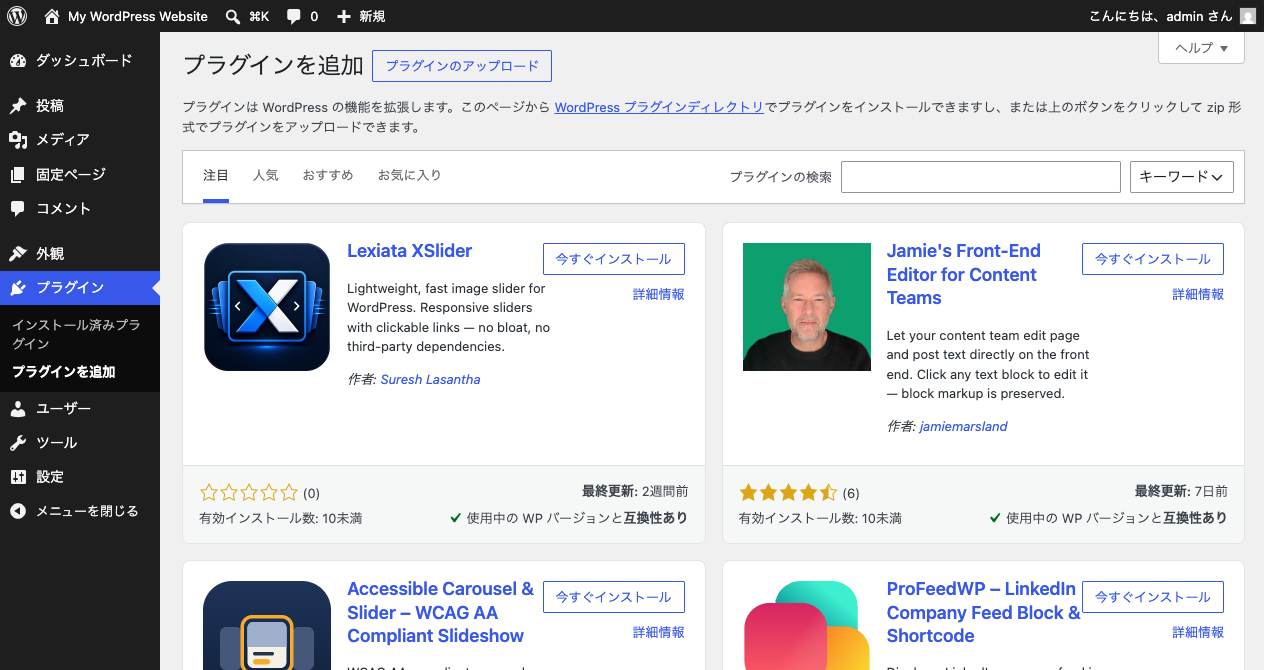
- Install Now—download to your site
- Activate—it actually starts working
It’s the same flow as a theme, but there’s one difference. Whereas you can only wear one theme at a time, you can activate multiple plugins at once.
How to choose—look at “is it safe?” first
A plugin is a program that runs inside your site, so you shouldn’t just install anything you come across. Low-quality or abandoned ones can be the source of bugs and security holes. Before installing, check these three.
- Last-updated date—has it been left untouched for years? A guideline is within the last year
- Number of active installs—the more people using it, the easier problems are to find and fix
- Rating and reviews—the number of stars, and what the reviews actually say
After installing, too: don’t leave updates unattended
Installing a plugin isn’t the end. Developers ship updated versions every time a bug or security hole is found. When a notice about updates appears in the admin screen, apply it instead of leaving it.
An out-of-date plugin means a security hole someone has already found is left unpatched. Once you start running a real site, logging in regularly to check whether updates exist is one of an operator’s important jobs.
Summary of this lesson
- A plugin is an app you install into your site—a form, SEO, backups; just install to add them
- Installing is the same Install → Activate as a theme. But you can use multiple plugins at once
- Before choosing, check the update date, install count, and rating, and keep to the minimum necessary—don’t add too many