
npm is a system for “putting some stranger’s parts on your own PC and running them.” That’s exactly why you’ll want to know about the supply chain attack—an attack that mixes poison into the supply route of parts—and its headline example, the Shai-Hulud incident. It looks like a hard topic, but the core of the defense is “install habits,” which means beginners are in a good position to protect themselves starting today.
npmWhat is npm? What does npm install actually do?If npm and node_modules haven’t quite clicked yet, read this firstA supply chain attack mixes poison into the materials
Hacking your site directly is hard work. So attackers changed their thinking—if you plant poison in the parts (packages) everyone uses, the poison reaches everyone who installs them. This is the supply chain attack.
npm packages have a mechanism that can run an attached program the moment you install them. In other words, an infected part starts running on your PC the very moment you type npm install. It doesn’t even wait for you to build or run anything.
The Shai-Hulud incident—a self-replicating “worm”
In 2025, this attack became reality on an unprecedented scale. The name comes from the giant sandworms in the novel Dune.
- September 2025 (first wave)—installing an infected package searches for and steals the npm and GitHub credentials (master keys) on the PC. Then, using those stolen keys, it plants poison in other packages that same developer publishes and republishes them—a “worm (self-replicating type)” that spread the infection without any human involvement
- November 2025 (second wave, “The Second Coming”)—an even larger-scale return. About 800 packages and over 1,000 versions, including well-known names like Zapier, PostHog, and Postman, were contaminated, and the stolen information was published to tens of thousands of GitHub repositories
The victims weren’t “people who visited a shady site.” They were developers who just ran npm install as usual. That’s the scariest part of this incident.
Defense 1: Pin versions to “exact”
If a version in package.json is a range specifier like ^1.2.3, then whenever you install without a package-lock.json in place (a fresh install, an install after deleting the lock, or the lock-updating install covered in Defense 2), the newest version within that range at that moment gets installed. Install right after a poisoned new version is published, and you’ll pull it in automatically—the very route Shai-Hulud spread through.
If you keep it to an exact specifier with no symbols (version pinning) like 1.2.3, it won’t advance to a newer version on its own. Updating becomes a deliberate act of “choosing to bump it yourself.”
npm config set save-exact trueWith this setting, from then on npm install <name> automatically records the exact version, with no ^ attached.
Defense 2: Cherish package-lock.json
package-lock.json is “an exact record of all the parts that were actually installed.” Put it in Git, and the next install brings in the same parts exactly as recorded. Even if a range specifier ^ remains, the lock file is the insurance that keeps things from drifting.
- Always commit it to Git (don’t put it in .gitignore)
- In CI and reinstalls, using
npm ciinstalls in a form that matches the lock file’s record exactly
Defense 3: Don’t jump on a brand-new version
A poisoned version is usually found and deleted within hours to a few days of publishing. Put another way, right after publishing is the danger zone. Instead of bumping the moment “a new version is out!”, just waiting a few days to two weeks before bumping greatly lowers the risk. In fact, after Shai-Hulud, even major companies adopted the practice of “don’t install a new version for 14 days after it’s published.”
Defense 4: Don’t casually npm install unfamiliar projects
A program runs the moment you install—which means running npm install on a project of unknown origin you picked up on GitHub is like pressing the run button on a stranger’s program. If you only want to try it, there’s an option that stops the attached program from running.
npm install --ignore-scriptsDefense 5: Take a breath before installing—checking a package’s “identity”
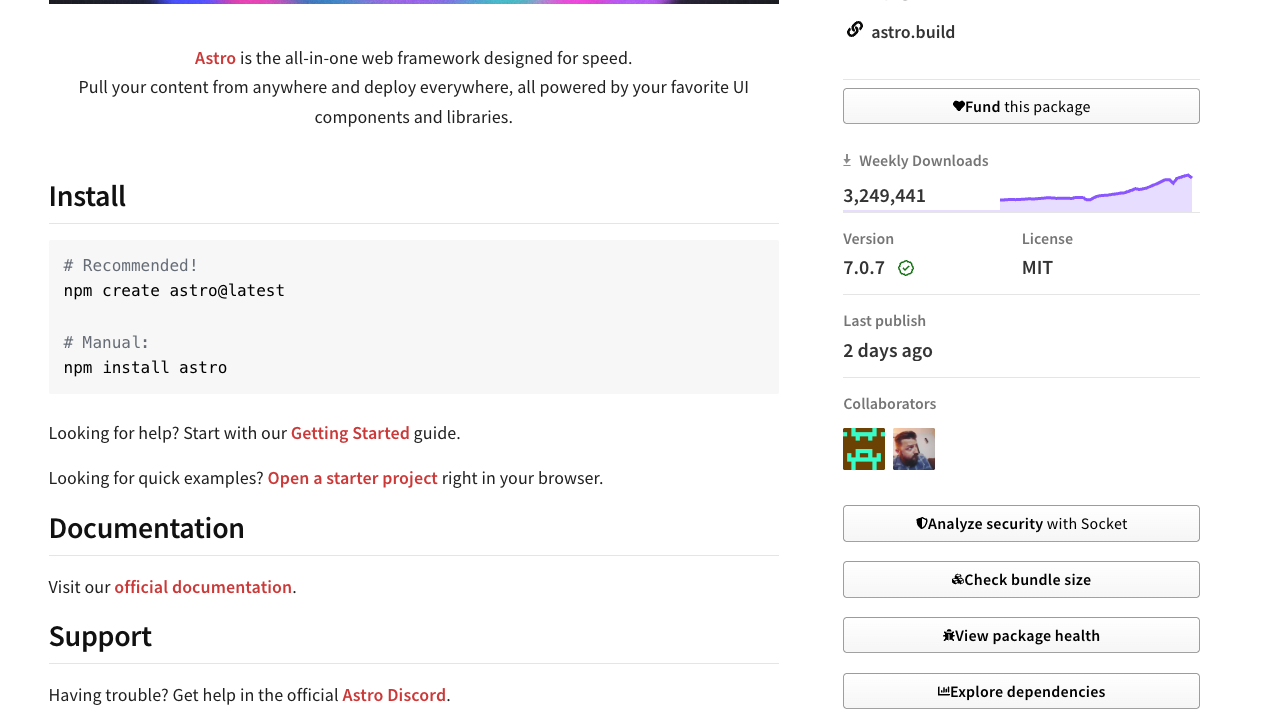
Before adding a new package, spend just 30 seconds looking at its page on the npm official site.
- Weekly download count—be cautious with ones that are extremely low
- Spelling of the name—fakes that impersonate common typos of popular package names (typosquatting) really do exist
- Last updated date and description—is it abandoned, does the description make sense
Defense 6: Check what you already have with npm audit
There’s also a command that checks all at once whether any known vulnerabilities exist among the parts already installed.
npm auditIt shows a list with severity levels, and you can also try automatic fixes with npm audit fix (it can jump all the way up to a new major version, so don’t forget to check that things still work after a fix).
Summary of this lesson
- A supply chain attack mixes poison into the parts. On npm, the poison runs the moment you
npm install - The Shai-Hulud incident (2025) was self-replicating and contaminated hundreds of packages—the victims were “people who installed normally”
- Defense is about habits: pin versions, put the lock file in Git, don’t jump on new versions, avoid installs of unknown origin, and check the identity before installing
We’ve told a scary story, but the goal isn’t to scare you—it’s to help you learn how to buckle your seatbelt. Once it becomes a habit, you can enjoy the benefits of the parts with peace of mind.